
Frequently Asked Questions
Eventzee App
How do I ask for help?
The best way to get in touch with us is using Admin messages. Click either Event or Social at the bottom of the screen. Then to send us a message privately, click the Envelope icon in the top right and then make sure you are on the Admin tab.
How do I check my points for an event?
Can I use a single account on multiple devices?
Yes, you can share an Eventzee login across multiple mobile devices and the browser version.
How do I use multiple accounts on a single device?
We suggest one of two options to use multiple accounts with one device:
- You can have two accounts logged in simultaneously to Eventzee. One using the mobile app and the other using your mobile browser using the link https://eventzee-app.web.app/. You can also submit using a computer browser with the same link. We suggest scaling the computer browser horizontally so it is more like a mobile device on screen.
- You can logout and login to switch accounts in the mobile app or browser app. It is under the hamburger menu (☰) in the top left corner, Settings.
Is there a user manual for Eventzee?
To view the Eventzee App Help, either:
- Click the hamburger menu (☰) on the top left of Eventzee, then click Help or;
- Visit the website by clicking here.
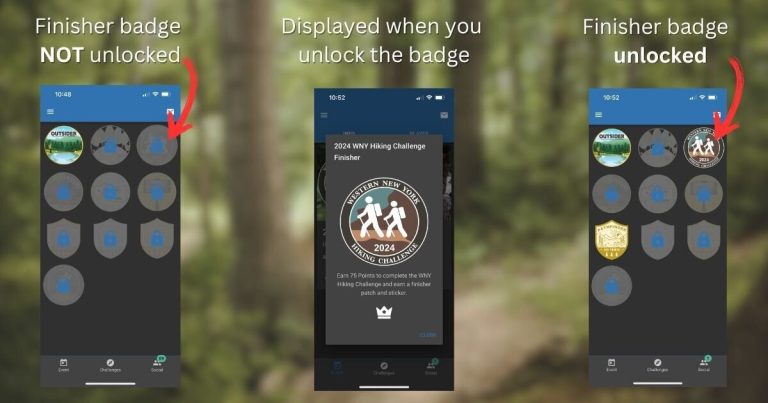
How do I check if I finished a challenge?
What happens if I do not have service?
No worries, take a photo with your phone and upload your photo when you get back into cell service.
Why didn't I receive credit right away for my challenge submission?
We auto-approve most, but not all challenges. There are some challenges that we want to review by hand. These will be approved within 24-hours and you will be notified when this happens. Who knows, we might even give you bonus points.
How do I see the photo I submitted? What if I do not like it?
You can view your photos using the My Photos menu item in the hamburger menu (☰) menu. Only admins can remove photos, send us a note via Admin messages (use the Envelope in top right) if you need one removed. We suggest using the Camera option when uploading photos. You will be given the option to retake if you do not like it.
What if I uploaded a photo to the wrong challenge?
Send us a note via Admin messages (use the Envelope in top right), we will reject your submission so you can resubmit at a later time.
Will other participants be able to see my email address?
No, only your username will be visible to participants, so choose wisely.
I do not see my completed trails under the completed tab?
Trail, Mileage, Bonus and Stewardship challenges are in groups. You will not see these challenges show up in the completed tab until you complete all of the items within the group. If there is a green Approved checkmark next to the trail, you have received credit for that submission.
What if Eventzee is acting weird?
Completely close out the Eventzee app and relaunch.
- To close out the app on iPhone, follow these steps. To close out the app on Android, follow these steps.
- Try logging out and then back in. To logout, go to the hamburger menu (☰), select Settings and then select Logout.
- If #1 & #2 do not resolve the issue, please uninstall the Eventzee app and reinstall the Eventzee app. Then, login with your username and password after you reinstall the app. Your data is stored in the cloud.
If these steps do not resolve your issue, please let us know.
Ultimate Hiking Challenge
What does the Ultimate Hiking Challenge PDF contain?
When you register, you will receive an email with your order details and a link to the 2025 Ultimate Hiking Challenge PDF. The PDF contains the complete Challenge rules, how to download and use our challenge app, a description of this year’s Challenge beneficiaries, and resources to get you started.
What qualifies as a hike?
A hike is traveling by foot in a natural setting, such as forests, mountains, deserts, or parks, rather than urban or paved areas. Trail running is acceptable.
Hikes must be at least one mile in length and can be repeated. We encourage you to challenge yourself by exploring new trails and discovering fresh adventures!
Walking your dog around your neighborhood does not qualify as a hike.
Can I repeat hikes?
Yes, hikes and locations can be repeated.
Is the challenge accessible?
Absolutely! The challenge is inclusive and open to individuals of all body types, mobility levels, and ages. Participants have the flexibility to choose trails that align with their personal goals, abilities, and skills, ensuring a safe and enjoyable experience for everyone in their group.
If your mobility level does not allow you to hike 20 miles on accessible trails, let us know, we will work with you to set an attainable, personal goal.
What are the bonus challenges?
Earn up to 50 additional points each month by completing unique bonus challenges. Challenges are revealed monthly and remain available for completion throughout the year. These challenges push your limits with goals for distance and elevation, inspire you to explore new trails, and include stewardship activities to give back to the trails and environment.
Examples of bonus challenges include:
- Hike 5 or more miles in a day.
- Hike 10 or more miles in a day.
- Climb 500 ft. in one hike.
- Climb 1,000 ft. in one hike.
- Hike to a waterfall.
- Hike at sunset.
- Pick up trash on the trail.
- Take a Leave No Trace Awareness class.
Why is there a monthly mileage goal and not a single mileage goal?
By hiking 20 miles per month, participants will make hiking lifestyle. It also encourages participants to experience nature in all seasons.
Does it have to be a named trail?
No, but you will need to track your mileage with a smartphone, smartwatch, or GPS and describe an approximate location.
How do I log miles and upload my log sheet?
You can log miles in using our PDF log sheet in two ways:
- You can print out our PDF log sheet and take a photo of your written journal of hikes to upload to our app.
- You can use our PDF log sheet digitally and upload the PDF or take a screenshot to upload to our app.
Our app accepts log sheets in JPG, PNG, & PDF format. There are multiple options to upload your log sheet:
Written Log Sheets
- Print out the log sheet.
- Fill out the printed log sheet with your monthly hikes.
- Take a picture of the log sheet with your phone’s camera.
- Upload the picture from your photos Library to the monthly Upload Your Log Sheet photo challenge in the app.
Log Sheets completed on a Mac or PC
- Download the log sheet using your browser.
- Open the log sheet with Adobe Acrobat Reader.
- Fill out the log sheet with your monthly hikes using Adobe Acrobat Reader.
- Upload the PDF to the monthly Upload Your Log Sheet photo challenge using the browser version of the app*.
On Mac, in the file dialog box, click Show Options and select All Files.
* Alternately, you can Export the log sheet as a JPG OR convert a PDF to a JPG using Adobe’s online tool or Canva’s online tool.
How to convert from a PDF into an image file
Log Sheets completed on a mobile device
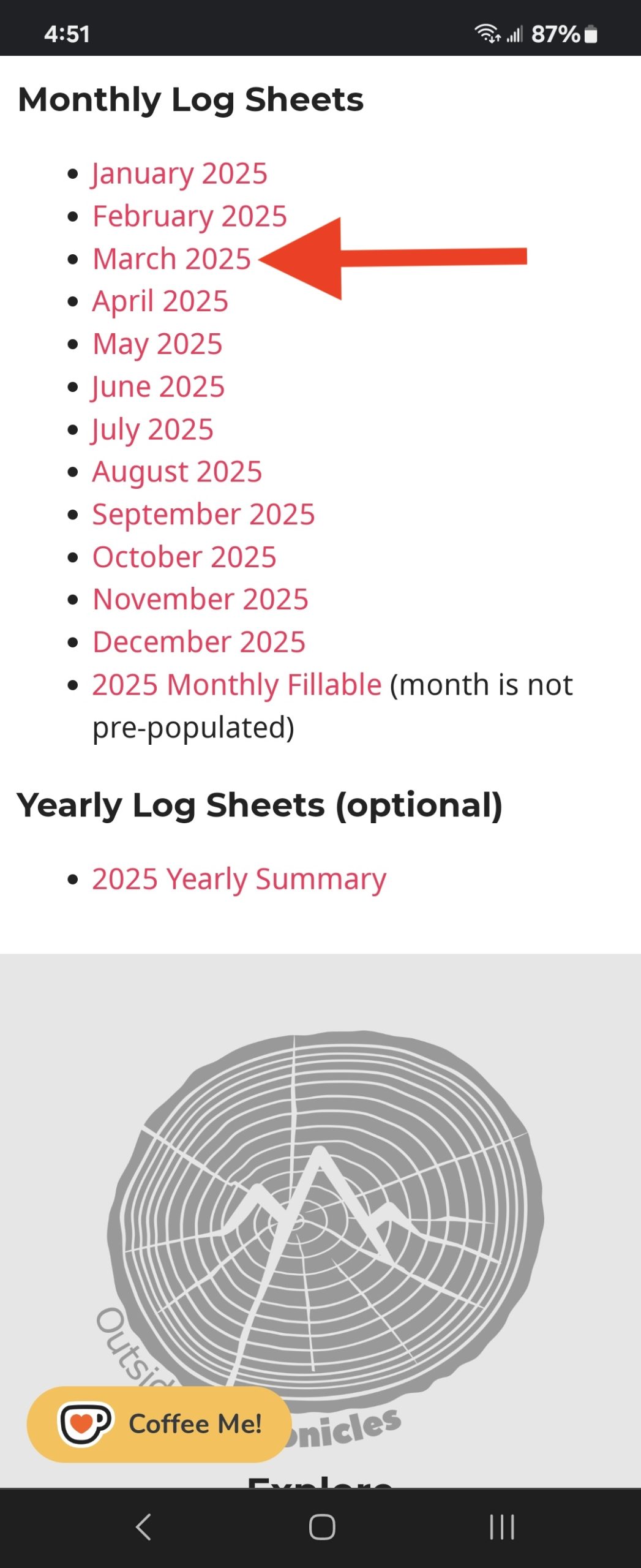
- Download the log sheet using your mobile browser.
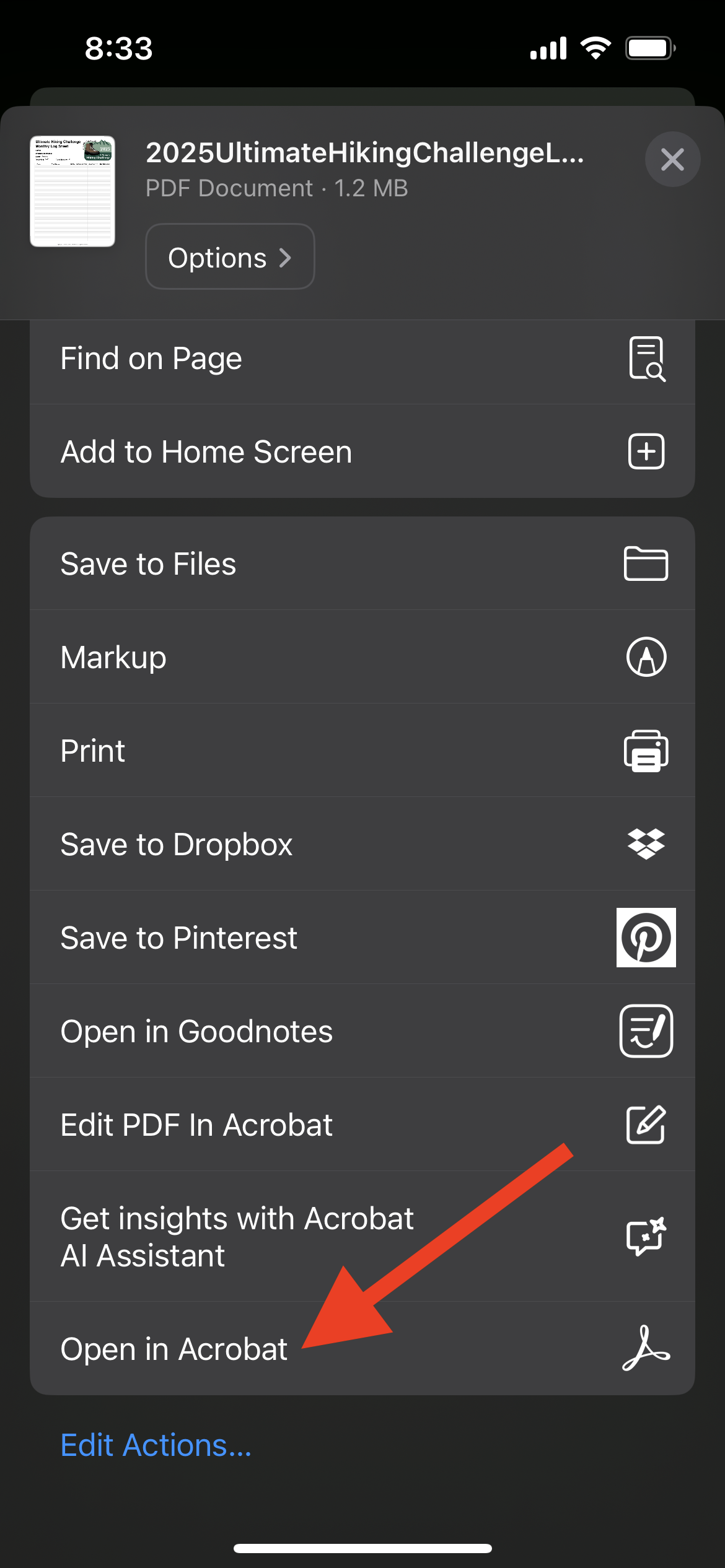
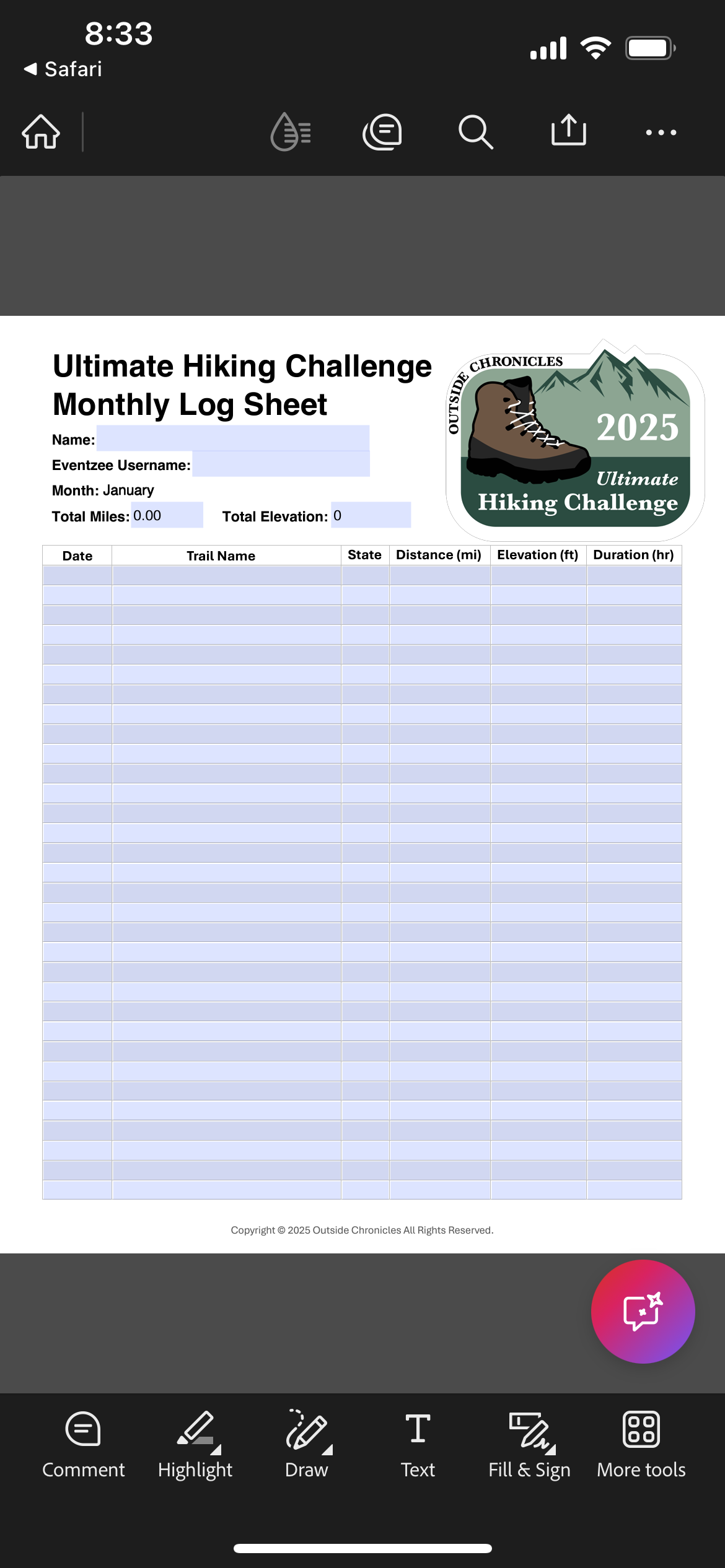
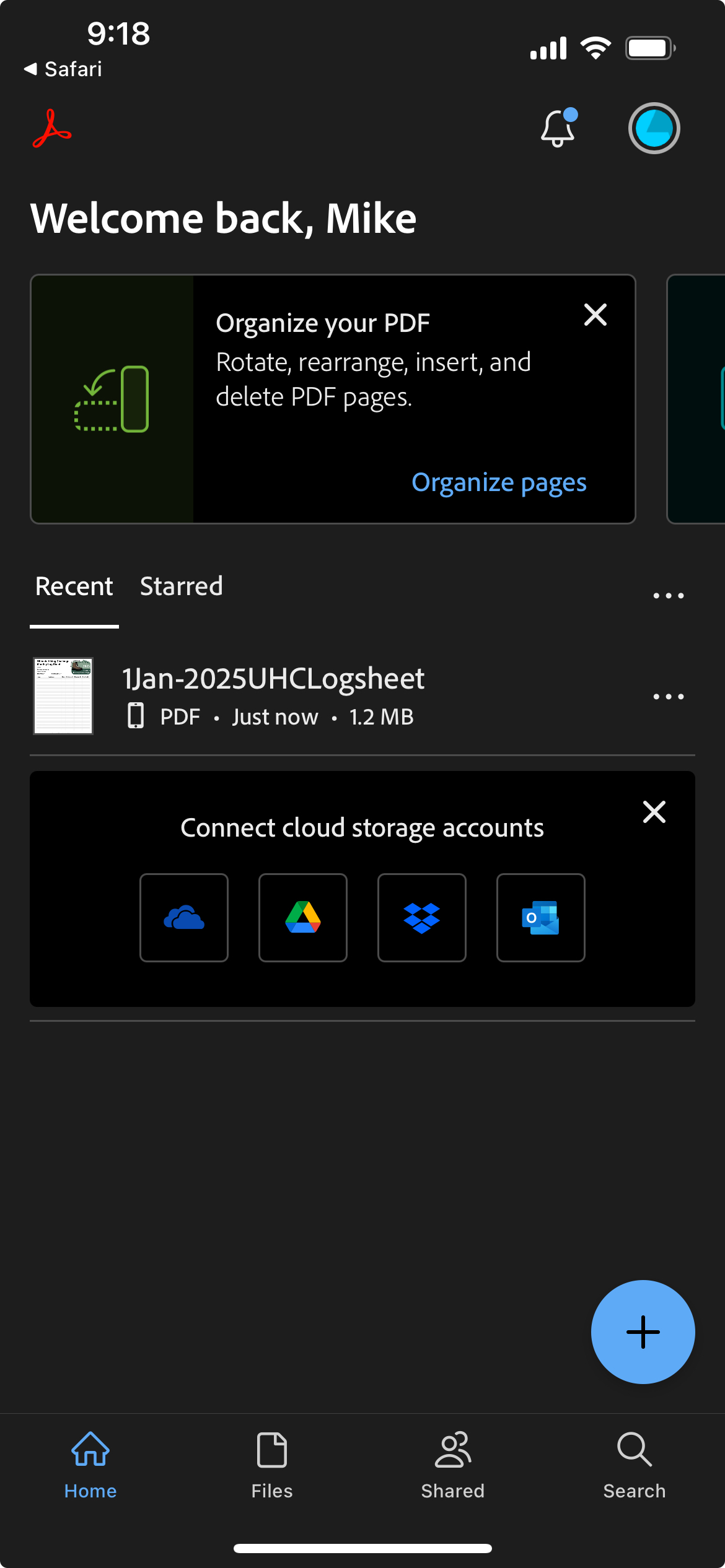
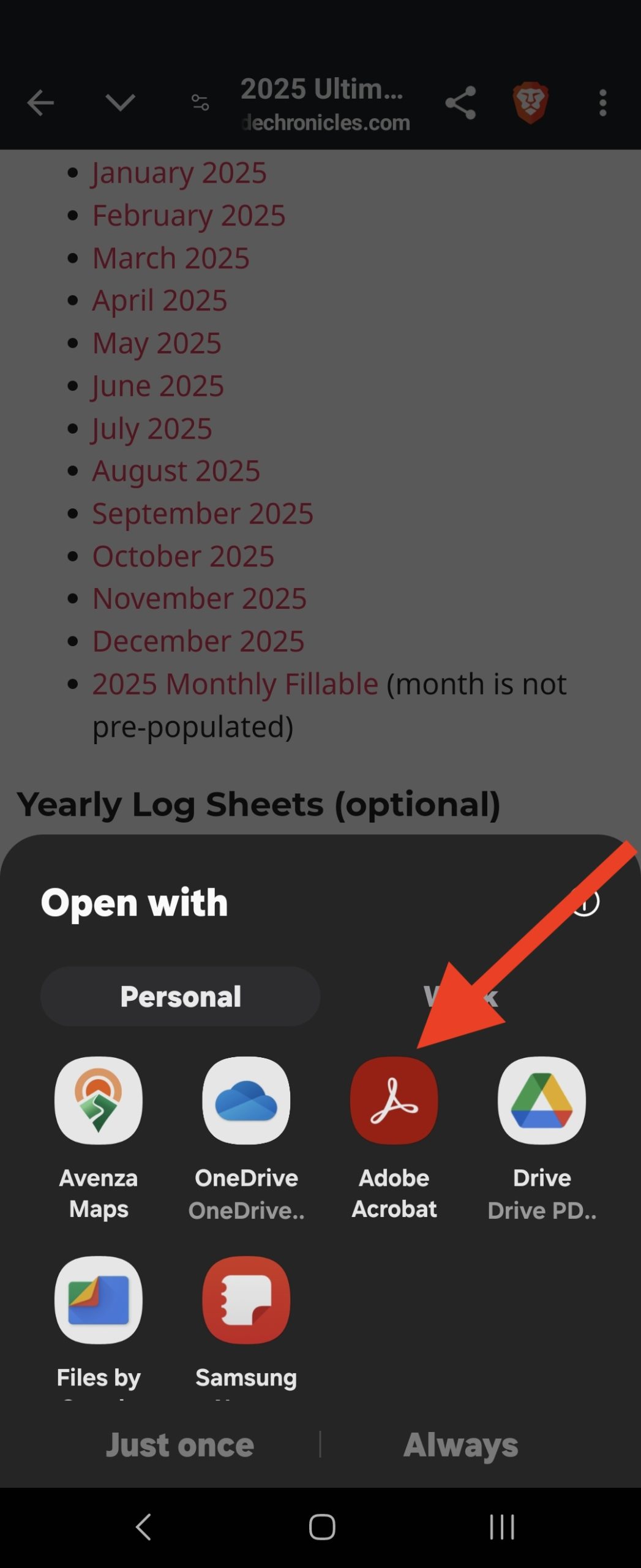
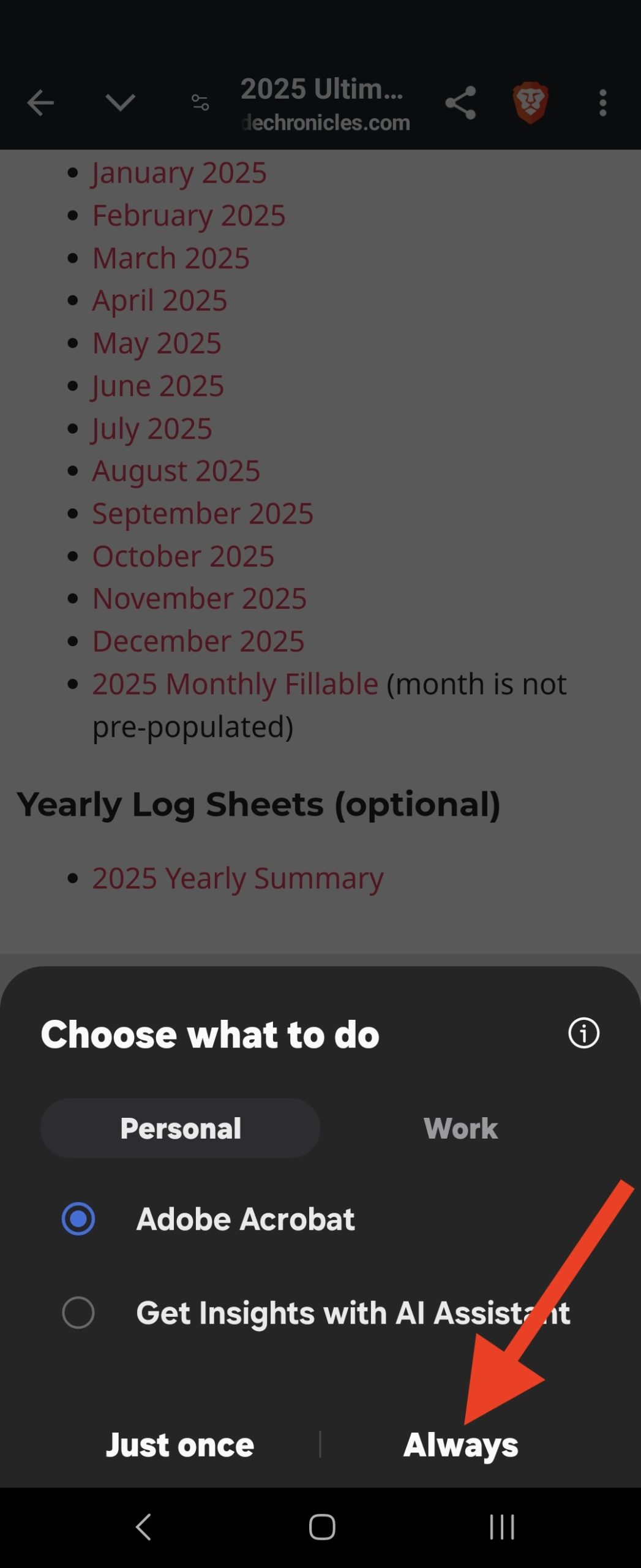
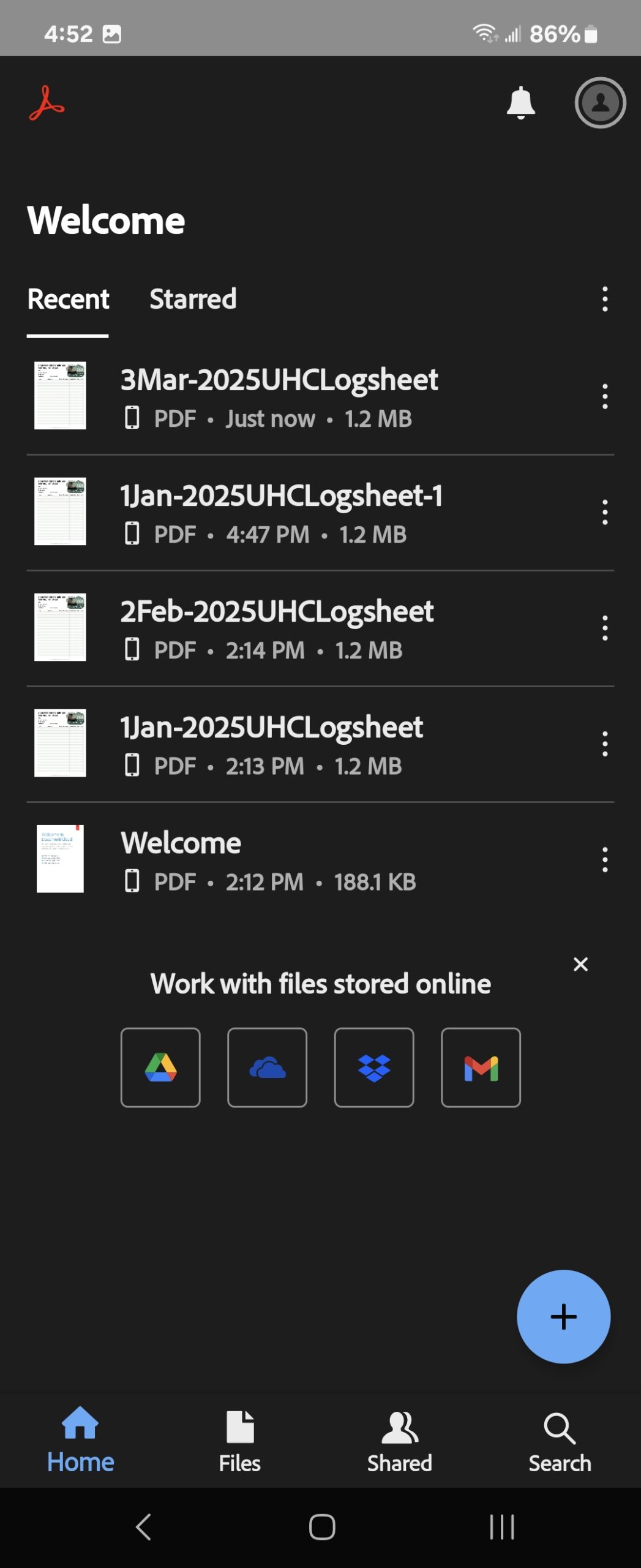
- Open the log sheet with Adobe Acrobat Mobile, see below images.
How to read PDFs on an iPhone
How to read PDFs on Android - Fill out the log sheet with your monthly hikes using Adobe Acrobat Mobile.
- Upload the PDF using PDF file option to the monthly Upload Your Log Sheet photo challenge in the app*.
How to take a screenshot on iPhone
How to take a screenshot on Android
How to Open PDF on iPhone
How to Open PDF on Android
How do I track my miles?
You can track your mileage using a smartphone app, smartwatch, or handheld GPS device. If none of these are available, you can estimate your distance using mileage information at the trailhead or from a paper map.
If you’re looking for a smartphone app, we recommend starting with Strava, Runkeeper, AllTrails, MapMyWalk, or Gaia GPS; each offering reliable features to enhance your hiking experience.
What is elevation on the log sheets?
The log sheets have a field for elevation (ft). This is the total elevation gained during your hike. Depending on the app or device you are using to track the hike, it may be called elevation, elevation gain, ascent, or total ascent.
Elevation gain on a hike refers to the total amount of vertical ascent you make during the hike. It’s the sum of all the uphill portions, regardless of how many times the trail goes up and down.
Example:
- If you start at 1,000 feet elevation and hike to 2,000 feet without any descents, your elevation gain is 1,000 feet.
- But if the trail goes up 500 ft, down 200 ft, up another 700 ft, your total elevation gain is 1,200 feet (500 + 700).
Depending on the app and device you are using to track elevation, your results may vary. Strava has an excellent article describing the variances.
When does the challenge begin and end?
The Challenge officially begins on January 1, 2025, and all hikes and challenges must be completed by December 31, 2025, at 11:59 PM. You can register anytime between January 1 and December 31, and your personal challenge starts as soon as you receive your order confirmation.
What if I join mid-year?
No problem, you will have plenty of points to complete the challenge. You will be able to earn 50 points for hiking 20 miles or more for the remaining months. Plus you will have access to all revealed and new bonus challenges.
For example, if you join in July, you can still log hiking miles for 6 months (July-Dec) for 300 points. You will also be able to earn 300 points from bonus challenge revealed from January to July, and then 300 points for new bonus challenges revealed August to December.
It is best to get an early start!
Can I use my health insurance rewards for the Challenge?
Yes, probably.
We have worked with health insurance providers in Western New York to have our Challenge and other Outside Chronicles services included as member benefits. We are happy to work with your insurance provider. If your provider uses a reimbursement form, you can submit your order confirmation as proof of participation. If your provider uses a rewards credit card, we will work to be added as an accepted vendor.
For Independent Health, please use your Health Extras card like a credit card at checkout.
For Highmark WNY, you will need to use your credit/debit card and submit a Wellness Card Reimbursement Claim Form. Claims can be submitted on the member website. Log in at myhighmark.com and click Manage under Spending Account Balance to access your personal dashboard. Then, select Claims and Claims Activity under the menu in the upper left corner to submit your claim.
Do you offer gift certificates?
Yes, we sell gift cards in our store.
What if someone else ordered or gave the challenge as a gift?
You have a great friend!
Have your friend e-mail you the order confirmation or the link to the Challenge PDF. You can use the join code in the PDF to join our event in the app. You also need the order confirmation number to complete the challenge. It is found on the order confirmation e-mail. If you can’t find it, contact us.
Be sure to email us to update your contact information so we can send your patch and stickers.
I’m new to hiking, what do I need to know?
First of all, you will need appropriate hiking footwear. Crocs and sandals are not appropriate. You can get away with a good pair of sneakers on the easy trails, but we highly recommend trail runners or hiking boots on moderate to strenuous hikes. Almost as important as your boots, are your socks. We suggested spending a little extra for Darn Tough socks (ankle or crew). You won’t be sorry and they have a lifetime warranty. However, any synthetic or wool sock will work.
Next you are going to need appropriate clothing. Synthetic clothing is a must to manage perspiration in warm and cold weather. Your layers will largely depend on the ambient temperature and weather conditions. We always suggest carrying a rain shell in the fair weather months.
Finally, we suggest someone in your group carry the 10 Essentials on every hike. Every hiker should have a headlamp and whistle at all times. We have a Resources page with checklists and links to our instructional videos.
Remember to tell someone where you are hiking and when you anticipate being done.
How do I NOT get lost on the trails?
Start small and hike with a buddy. Stick to well-marked, popular trails. We suggest using a mobile GPS app like GaiaGPS, Avenza Maps, or AllTrails.
We also highly suggest taking a paper map and learning basic map and compass skills. We have videos to help you there, too!
Remember to tell someone where you are hiking and when you anticipate being done.
When do I receive my patch?
We will send out patches to new finishers at the beginning of each month.
How do I know if I completed the Challenge?
You’ve officially completed the challenge once you unlock the Finisher Badge in the app!
How do I find my order number?
You can find your order number in your order confirmation email, which also includes the link to the Challenge PDF.
If you haven’t received your confirmation email, please check your spam folder. Still can’t find it? Reach out to us for assistance!
Where does my registration fee go?
Part of your registration fee supports the operation of the challenge and challenge prizes. We are committed to donating a significant portion of the proceeds back to our trails and natural environment. See how we have given back through our challenges.
The 2025 Ultimate Hiking Challenge is supporting Leave No Trace.
Can I use snowshoes or cross-country skis?
Yes, snowshoes and cross-country skis are perfectly acceptable modes of travel when conditions require them.
I am participating in other hiking challenges, can I share the miles?
Yes, you can “double dip” with our other challenges. You may also use miles hiked for other challenges like the Finger Lakes Trail 50/100 challenge , the North Country Trail Hike 100 Challenge, or other major trail challenges.
What do I do when I complete the challenge?
If you received the finisher badge in our app, you have completed the challenge. The only thing you need to do is watch your e-mail inbox for your completion certificate. We will mail out new finisher patches at the beginning of each month.
Then keep going! You can earn more points and chances at a tee shirt.
How do I win a tee shirt?
Hike 20 or miles per month and upload your log sheet. Do this successfully, and you will be entered into our monthly tee shirt drawing.
WNY Hiking Challenge
What does the WNY Hiking Challenge Packet contain?
When you register, you will get the complete Challenge rules, a description of this year’s Challenge beneficiaries, a map, and description for every hike with links to a digital map to use with Avenza Maps, check out a few sample pages here.
I lost my PDF, how do I download it again?
No problem, you can download it again under your Account Settings.
To access your Account Settings, you must be logged in first.
If you do not know your username or password, you can reset it on the login page.
How long and hard are the hikes?
We offer a range of hikes that vary in length and difficulty to cater to different hiking levels. Most of our hikes are between 2-5 miles, with a few exceptions that are longer at 8-10 miles. For those seeking a greater challenge, we have Ultra hikes that range from 15-25 miles. However, it’s always up to you to decide which hikes to participate in; you are not obligated to hike the longer trails. Our hikes are rated as easy, moderate, difficult, and strenuous. We base our difficultly level on distance and elevation gain (ascent). Completing the challenge is possible by hiking easy and moderate trails. We suggest starting with the easy hikes, which will help you build up your experience and confidence for tackling more challenging hikes.
Do you offer gift certificates?
Yes, we are currently migrating to a new shopping cart system. We can manually issue gift certificates. Reach out to us if you are interested.
Are there any family discounts?
Yes, the family rate is $65 and entitles your family to up to 4 patches (including pets, +$5 for additional patches) upon completion of the Challenge. Just select Family at checkout. Families use a shared app account and upload one group picture per hike or challenge.
Although we want all family members to go on every hike, we understand that things happen and this may not always be possible. We ask that most family members be present on a majority of trails. And those family members who show up for every hike can hold the patch over the slackers, just kidding!
Is the challenge family-friendly or good for young children?
We have had many families and children of all ages complete our hiking challenge. We feature several family-friendly hikes that are 2 miles or less, and some are even stroller-friendly. Many hikes are easily doable with young kids, and they might even surprise you. Just make sure to have some ice cream after the hike and ensure that the young ones are properly hydrated and have some snacks for the trails. Remember, it is all about getting outside together. Even if you have a meltdown and don’t make it to the challenge landmark, it’s no problem, it still counts!
Are there discounts for scouts?
Yes, registered Girl Scouts, Scouts BSA, and active Scout leaders will receive a $5 discount. Use coupon code scouts. Please enter your troop number at in the Order Notes at checkout.
Do I need to register by Dec 21 for the winter challenge or May 1 for the summer challenge?
No, you can register anytime between the beginning of the challenge and the final day. You need to earn 50 points by March 20 for the winter challenge and 75 points by November 15 for the summer challenge to earn a patch and sticker.
Are dogs welcome at the Challenge?
Absolutely, they can even register with their owner(s) and earn a patch. Proceeds from pet registrations benefit Sadie’s Safe Harbor Canine Rescue. Please follow each park’s rules when you bring your dog (i.e. they must be licensed, kept on a leash and you must clean up after them).
Choose the Pet and Owner or Family products in our store.
Do I need to be in the selfie?
No, we respect your privacy and understand if you do not want your image online or in the app feed. In this case, take a picture of the landmark. Some people bring along an action figure or other object as a stand-in.
I’m new to hiking, what do I need to know?
First of all, you will need appropriate hiking footwear. Crocs and sandals are not appropriate. You can get away with a good pair of sneakers on the easy trails, but we highly recommend trail runners or hiking boots on moderate to strenuous hikes. Almost as important as your boots, are your socks. We suggested spending a little extra for Darn Tough socks (ankle or crew). You won’t be sorry and they have a lifetime warranty. However, any synthetic or wool sock will work.
Next you are going to need appropriate clothing. Synthetic clothing is a must to manage perspiration in warm and cold weather. Your layers will largely depend on the ambient temperature and weather conditions. We always suggest carrying a rain shell in the fair weather months.
Finally, we suggest someone in your group carry the 10 Essentials on every hike. Every hiker should have a headlamp and whistle at all times. We have a Resources page with checklists and links to our instructional videos.
How do I not get lost on the trails?
The Challenge Packet contains QR codes to download live maps to Avenza Maps. We have created two tutorial videos for Challenge participants. The first video shows you how to import maps and use basic features. The second video shows you how to use Avenza Maps while on the trail. We also highly suggest taking a paper map and learning basic map and compass skills. We have videos to help you there too!
You mentioned that a book acted as the inspiration for these Challenges?
Correct, the book is out of print, but you may be able to find it used on Amazon or at the library. The book is Secret Places: Scenic Treasures of Western New York and Southern Ontario by Bruce Kershner.
The late Bruce Kershner was a great conservationist and advocate for places like Reinstein Woods and Zoar Valley. *He was also my wife’s high school teacher.
Good news, there is an updated version of Secret Places of Western New York written by Jennifer Hillman and William McKeever. The new version includes some of Kershner’s Secret Places and some new ones taken from his notes. It is a very well done tribute to the original book.
I’m new to hiking, what do I need to know?
WNY Waterfall Challenge
What does the WNY WaterFALL Challenge Packet contain?
When you register, you will get the complete Challenge rules, a description of this year’s Challenge beneficiaries, a map, and a description for every hike with links to a digital map to use with Avenza Maps, check out a few sample pages here.
How hard is it to find the waterfalls?
We offer a range of locations that vary in length and difficulty to cater to different levels. Some waterfalls can be seen from your car or a short walk, others will require a short walk on paved or gravel surfaces, while others require a short hike on dirt and uneven surfaces. Many of the locations are friendly to families and those with mobility issues.
Are there any family discounts?
Yes, the family rate is $65 and entitles your family to up to 4 patches (including pets, +$5 for additional patches) upon completion of the Challenge. Just select Family at checkout. Families use a shared app account and upload one group picture per hike or challenge.
Although we want all family members to go to every waterfall location, we understand that things happen and this may not always be possible. We ask that most family members be present on a majority of waterfalls. And those family members who show up for every hike can hold the patch over the slackers, just kidding!
Is the challenge family-friendly or good for young children?
Yes, absolutely! Many of the locations have paved or gravel paths that are stroller-friendly. You can easily complete the challenge without a strenuous hike. Just make sure to have some ice cream after the hike and ensure that the young ones are properly hydrated and have some snacks for the trails. Remember, it is all about getting outside together. Even if you have a meltdown and don’t make it to the challenge landmark, it’s no problem, it still counts!
Are there discounts for scouts?
Yes, registered Girl Scouts, Scouts BSA, and active Scout leaders will receive a $5 discount. Use coupon code scouts. Please enter your troop number at in the Order Notes at checkout.
Do I need to register by April 1?
No, you can register anytime between now and April 1 and June 30. You need to earn 25 points by June 30 to earn a patch and sticker.
Are dogs welcome at the Challenge?
Absolutely, they can even register with their owner(s) and earn a patch. Proceeds from pet registrations benefit Sadie’s Safe Harbor Canine Rescue. Please follow each park’s rules when you bring your dog (i.e. they must be licensed, kept on a leash and you must clean up after them).
Pets receive a standard patch and a special pet sticker.
Choose the Pet and Owner or Family products in our store.
I’m new to hiking, what do I need to know?
First of all, you will need appropriate hiking footwear. Crocs and sandals are not appropriate. You can get away with a good pair of sneakers on the easy trails, but we highly recommend trail runners or hiking boots on moderate to strenuous hikes. Almost as important as your boots, are your socks. We suggested spending a little extra for Darn Tough socks (ankle or crew). You won’t be sorry and they have a lifetime warranty. However, any synthetic or wool sock will work.
Next you are going to need appropriate clothing. Synthetic clothing is a must to manage perspiration in warm and cold weather. Your layers will largely depend on the ambient temperature and weather conditions. We always suggest carrying a rain shell in the fair weather months.
Finally, we suggest someone in your group carry the 10 Essentials on every hike. Every hiker should have a headlamp and whistle at all times. We have a Resources page with checklists and links to our instructional videos.
How do I not get lost on the trails?
The Challenge Packet contains QR codes to download live maps to Avenza Maps. We have created two tutorial videos for Challenge participants. The first video shows you how to import maps and use basic features. The second video shows you how to use Avenza Maps while on the trail. We also highly suggest taking a paper map and learning basic map and compass skills. We have videos to help you there too!
You mentioned that a book acted as the inspiration for these Challenges?
Correct, the book is out of print, but you may be able to find it used on Amazon or at the library. The book is Secret Places: Scenic Treasures of Western New York and Southern Ontario by Bruce Kershner.
The late Bruce Kershner was a great conservationist and advocate for places like Reinstein Woods and Zoar Valley. *He was also my wife’s high school teacher.
Good news, there is an updated version of Secret Places of Western New York written by Jennifer Hillman and William McKeever. The new version includes some of Kershner’s Secret Places and some new ones taken from his notes. It is a very well done tribute to the original book.